Companion app
Explore the app
The AquaSync app gets your vest ready before you get in and shows you what it told you after you're out. Bluetooth doesn't reach through water, so everything loads before the dive. Try it below.
Pick a screen to jump to it, or tap around inside the phone. The preview uses example dives and isn't connected to a vest.
The eight haptic points
The app's zone check uses the same eight points as the AquaSync vest: six on the front and two at the back of the shoulders.
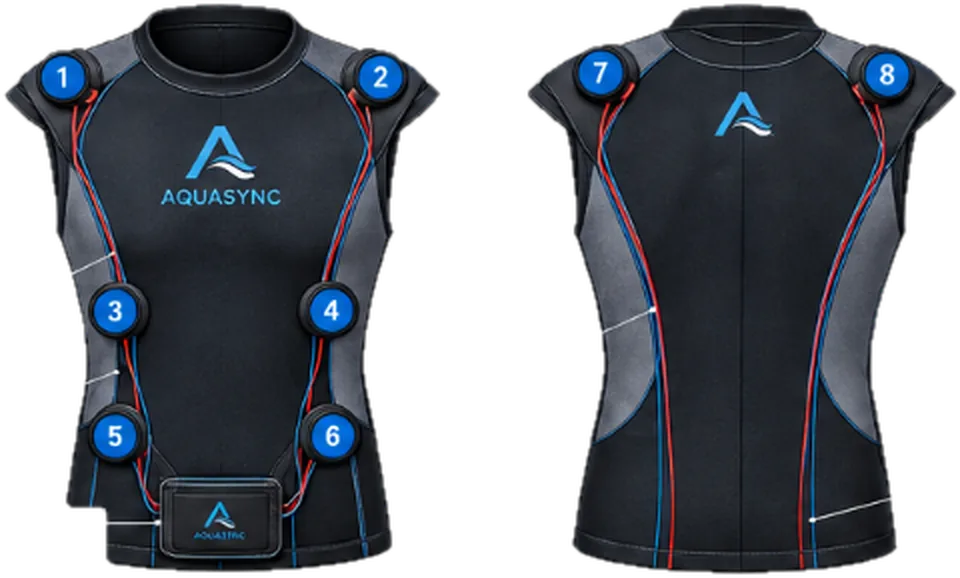
- 1Right shoulder
- 2Left shoulder
- 3Right ribs
- 4Left ribs
- 5Right lower torso
- 6Left lower torso
- 7Back left shoulder
- 8Back right shoulder
Left / right: points 2, 4, 6 or 1, 3, 5 along one side.
All good: two light taps on 1 and 2.
Attention: every point, longer and stronger.
Ascent: pulses rising from 5–6 to 3–4 to 1–2.
Low air: slow, deep pulses on 7 and 8.
Get the app
Open the app on your phone, then add it to your home screen. It opens full screen and works offline after the first visit.
iPhone
Open theaquasync.com/app in Safari, tap the Share button, then Add to Home Screen.
Android
Open theaquasync.com/app in Chrome, tap the ⋮ menu, then Install app.
Early preview. Live connection to the vest is still in development.